What is Kickstarter?
Kickstarter is a launchpad for creators to raise funds for the initial production of their invention. Backers (that’s you!) can support the creator by pre-ordering the product at a discounted price.
Last updated: April 06, 2021 10:56
What does it mean to back a project (pledge)?
When you back a project, you’re pre-ordering the product. That means you’ll get it once it’s produced. Besides getting the product itself, you’re also joining a community. Follow along the production process, take part in important surveys and give the creator valuable feedback.
Last updated: April 06, 2021 10:56
How do I pledge?
In order to pledge, click that green button that says “Back this project”. You’ll get to select your shipping country and choose your desired pledge level and reward.
Last updated: April 06, 2021 10:56
When is my money collected?
Your money will be collected only after the project ends on Friday, March 30th, 2021. If the project is cancelled for any reason, you won’t be charged.
Last updated: April 06, 2021 10:56
How do I get more Page Packs? Will they cost extra?
The Lined / Dot-Grid Combo Page Pack is standard when you back the Axis on Kickstarter. You’ll be able to purchase additional Page Packs as add-ons when you make your pledge, or later on when you get the Backerkit survey (that survey lets you update your mailing address and order anything additional you may want). If you wait until filling out your Backerkit survey, you will not have to pledge more ahead of time; you can make those purchases in Backerkit when the time comes.
Last updated: April 06, 2021 11:00
Can I add a single Rocketbook Axis to my order?
Yes! You can purchase an additional Axis as an add-on when you make your pledge, or later on when you get the Backerkit survey (that survey lets you update your mailing address and order anything additional you may want). If you wait until filling out your Backerkit survey, you will not have to pledge more ahead of time; you can make those purchases in Backerkit when the time comes.
Last updated: April 06, 2021 11:00
Can I add additional Pilot FriXion pens to my order?
Yes! You’ll be able to do so in the add-ons drop down menu when you make your pledge, or later on in the Backerkit survey (that survey lets you update your mailing address and order anything additional you may want). If you wait until filling out your Backerkit survey, you will not have to pledge more ahead of time; you can make those purchases in Backerkit when the time comes.
Last updated: April 06, 2021 11:00
What will the cost of shipping for add-ons be?
Shipping costs for any add-ons will be calculated in Backerkit after the campaign ends.
Last updated: April 06, 2021 11:00
What payment methods can I use?
You can use any debit or credit card associated with Visa, Mastercard or American Express, as well as Discover and JCB cards. Kickstarter does not accept payments with PayPal.
Last updated: April 06, 2021 10:56
To what countries can the Axis be shipped?
The Rocketbook Orbit can be shipped to everywhere listed below:
United Arab Emirates Australia Brazil Canada India Israel Japan South Korea Mexico Malaysia Norway New Zealand Saudi Arabia South Africa Singapore Switzerland United Kingdom United States Hong Kong European Union
Last updated: April 06, 2021 11:00
When will I get my Axis?
Axis orders are set to ship in November 2021. Depending on your location, you’ll get them sometime soon after that. Please note that this is an estimate, as you’re pre-ordering the product and production delays could arise.
Last updated: April 06, 2021 10:56
What are the dimensions of each Axis and their pages?
The following are prototype measurements and may change slightly, but should not significantly.
Letter sized Axis: 11.5in x 9.25in x 0.27in Letter sized pages: 8.5” x 11”
Executive sized Axis: 9.43in x 6.75in x 0.27in Executive sized pages: 6” x 8.8”
Last updated: April 06, 2021 11:00
Can I fold the Axis back to lay flat?
You for sure can! The Page Pack Rings allow for 360 rotation, and the Axis Cover is designed to lay flat when folded back over itself.
Last updated: April 06, 2021 11:00
How do Axis Page Packs connect to the cover?
Magnets, hooks, and a sloped slot design in spine allow for easy and secure page attachment. Easy to pull out and swap packs, but strong enough to keep your pages safely secured on the go and through every-day use.
Last updated: April 06, 2021 11:00
What will the Page Packs look like?
The Rocketbook Axis Page Packs are still in development, so there may still be a few changes! You’ll be able to take a closer look at our latest designs here: https://rocketbookhelp.zendesk.com/hc/en-us/articles/1500005715402-Rocketbook-Axis-Page-Packs
Last updated: April 06, 2021 11:00
Can I rearrange the pages within a Page Pack?
We do not recommend altering Page Packs, or manipulating the steel rings they are bound with. It might be doable with some considerable effort, but we just don’t think the re-closure will be as clean as when our machine originally clamps the rings. Custom Page Packs are for sure something in consideration for the future, though!
Last updated: April 06, 2021 11:00
Can I combine Page Packs?
We do not recommend altering page packs, or manipulating the steel rings they are bound with. It might be doable with some considerable effort, but we just don’t think the re-closure will be as clean as when our machine originally clamps the rings. Custom Page Packs are for sure something in consideration for the future, though!
Last updated: April 06, 2021 11:00
What’s the difference between the Axis and the existing Rocketbook notebooks?
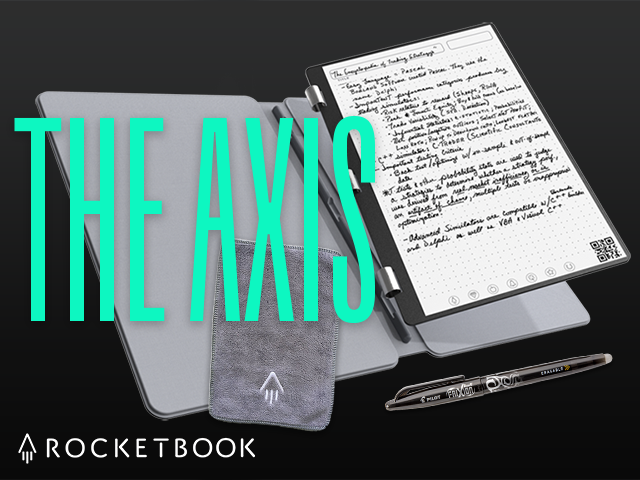
The Rocketbook Axis takes the same patented, infinitely-reusable, technology from previous Rocketbook products, and adds a sleek new design. The Axis features a durable hard cover, built-in Pen Pool, and a magnetic spine that allows you to swap through a collection of Page Packs at a moment’s notice.
Last updated: April 06, 2021 11:00
How is the Rocketbook app different from any other photo/scanner app?
For starters, our free Rocketbook app will auto-crop and color-pop your notebook pages to create a crisp and clear scanned image that standard photos can’t compete with.
Additionally, you’ll be able to scan and upload documents (even multi-page files) directly to various cloud destinations like Dropbox, Google Drive or your email in mere seconds. This space-tacular convenience isn’t matched by a standard scanning app.
We also offer certain OCR features that can transcribe your handwritten notes when sent to specific cloud destinations, automatically recognize your handwriting to name your files, and allow your notes to be searched by keyword within the app using our Smart Search.
Want to take a test flight? We offer free PDF downloads of Rocketbook pages for trial runs of the free Rocketbook app. Download our app and give it a try today.
https://www.dropbox.com/sh/eqnsm164v0sav3v/AAA-cMxpo8BhBH8sLOFbkUe2a?dl=0
Last updated: April 06, 2021 11:00
What are Smart Features?
Smart Features are our app features that utilize OCR (Optical Character Recognition) technology to turn your handwritten notes into digital text! The Axis allows for the use of the following Smart Features:
Smart Titles: Use the Title Bar atop every Axis page to automatically name the files you scan. Simply enable the feature in your app settings, write your title in the designated space, and scan away - your file will automatically be titled what you’ve written.
Smart Search: Smart Search allows you to search through your handwritten notes in the app, digitally. Our technology will automatically recognize what you’ve written out, which makes locating past notes a breeze.
Smart Lists: When you create a list in your notebook and scan the page, the Rocketbook app will automatically detect the list items and transcribe their tasks onto a new screen within the app! Just draw a checkbox before each list item, and make sure the feature is enabled in settings.
Full Page Transcription: For every scan you send to email, Evernote, OneNote or Google Drive, you’ll be able to have your notes turned into a digital text document! This feature will only be available for Dot Grid, Lined, and Blank pages.
We also have more features in development - so stay tuned! You can learn more about our existing Smart Feature in the Rocketbook Help Center (https://rocketbookhelp.zendesk.com/hc/en-us/sections/360001438553-Handwriting-Recognition-OCR-)
Last updated: April 06, 2021 11:00
Which Page Packs support full OCR transcription?
Smart Titles, Smart Search, and Smart Lists features will be accessible on all page types, however, due to some limitations of recognition on templated pages, full page transcription will only be available on Dot Grid, Lined, and Blank pages.
Last updated: April 06, 2021 11:00
What kind of pens or markers can I use?
We recommend you only use a Pilot FriXion pen or marker with your Rocketbook Axis. FriXion ink is washable and that, in conjunction with our synthetic paper, is what allows the Axis to erase using only a cloth dampened with water.
Your Rocketbook Axis comes with one FriXion pen and we offer a few add-ons of different pen packs for convenience. But you aren’t limited to purchasing pens from us. FriXion pens are made by Pilot and are available in many stores, like Staples, Walmart, Target, and Amazon.com, and are available in a wide variety of sizes and colors of both pens, markers, and highlighters. (http://amzn.to/2eNPYCs)
Last updated: April 06, 2021 11:00
How do I clean the Axis Page Packs?
Like the past Rocketbook notebooks, the endlessly reusable pages of the Axis erase with moisture and a wipe down with the included microfiber cloth. We also sell some pretty nifty Rocketbook spray bottles for on-the-go moisturized erasing convenience.
Last updated: April 06, 2021 11:00
Will moisture degrade the pages?
Nope! The Rocketbook Axis pages are a synthetic poly-blend that are impervious to water.
Last updated: April 06, 2021 11:00
Can I heat or microwave the Rocketbook Axis to erase it?
No! Erase your Axis by applying moisture and wiping it off. You’re not crazy for asking this, though, as the Rocketbook Wave (available at GetRocketbook.com) is designed to be microwave safe, so you can erase the whole notebook with heat in the microwave (or use a strong hairdryer, page by page).
Last updated: April 06, 2021 11:00
Where can I learn more?
For more information on the Orbit and all other Rocketbook products, head to our Help Center: https://rocketbookhelp.zendesk.com/hc/en-us
Last updated: April 06, 2021 11:00
What is BackerKit?
BackerKit is a service that crowdfunded project creators use to keep track of hundreds to tens of thousands of backers—from shipping details, pledge levels, preferences and quantities, whether they have paid or had their card declined, special notes, and everything in between!
The BackerKit software and support team is independent from the campaign’s project team—BackerKit does not handle the actual reward shipping. For more information about the preparation or delivery status of your rewards, please check the project's updates page.
How does BackerKit work?
After the campaign ends, the project creator will send you an email with a unique link to your survey. You can check out a walkthrough of the process here.
I never received my invitation. How do I complete the survey?
The most common reasons for not receiving a survey email is that you may be checking an email inbox different from the email address you used to sign up with Kickstarter, Indiegogo or Tilt Pro account, or it may be caught in your spam filter.
Confirm that the email address you are searching matches the email address tied to your Kickstarter, Indiegogo, or Tilt Pro account. If that doesn’t work, then try checking your spam, junk or promotions folders. You can also search for "backerkit” in your inbox.
To resend the survey to yourself, visit the project page and input the email address associated with your Kickstarter, Indiegogo or Tilt Pro account.
How do I update my shipping address?
BackerKit allows you to update your shipping address until the shipping addresses are locked by the project creator. To update your address, go back to your BackerKit survey by inputting your email here.
When will my order be shipped, charged or locked?
That is handled directly by the project creator. BackerKit functions independently of the project itself, so we do not have control of their physical shipping timeline. If you want to check on the project’s status, we recommend reading over the project's updates page.
I completed the survey, but haven't received my rewards yet. When will they arrive?
As BackerKit does not actually handle any rewards or shipping, the best way to stay updated on the shipping timeline would be to check out the project's updates page.